Guides
Why Website Migration Cost Ranges From $500 to $20,000 (and What You Actually Need)
By Rigo Guadron · · 9 min read
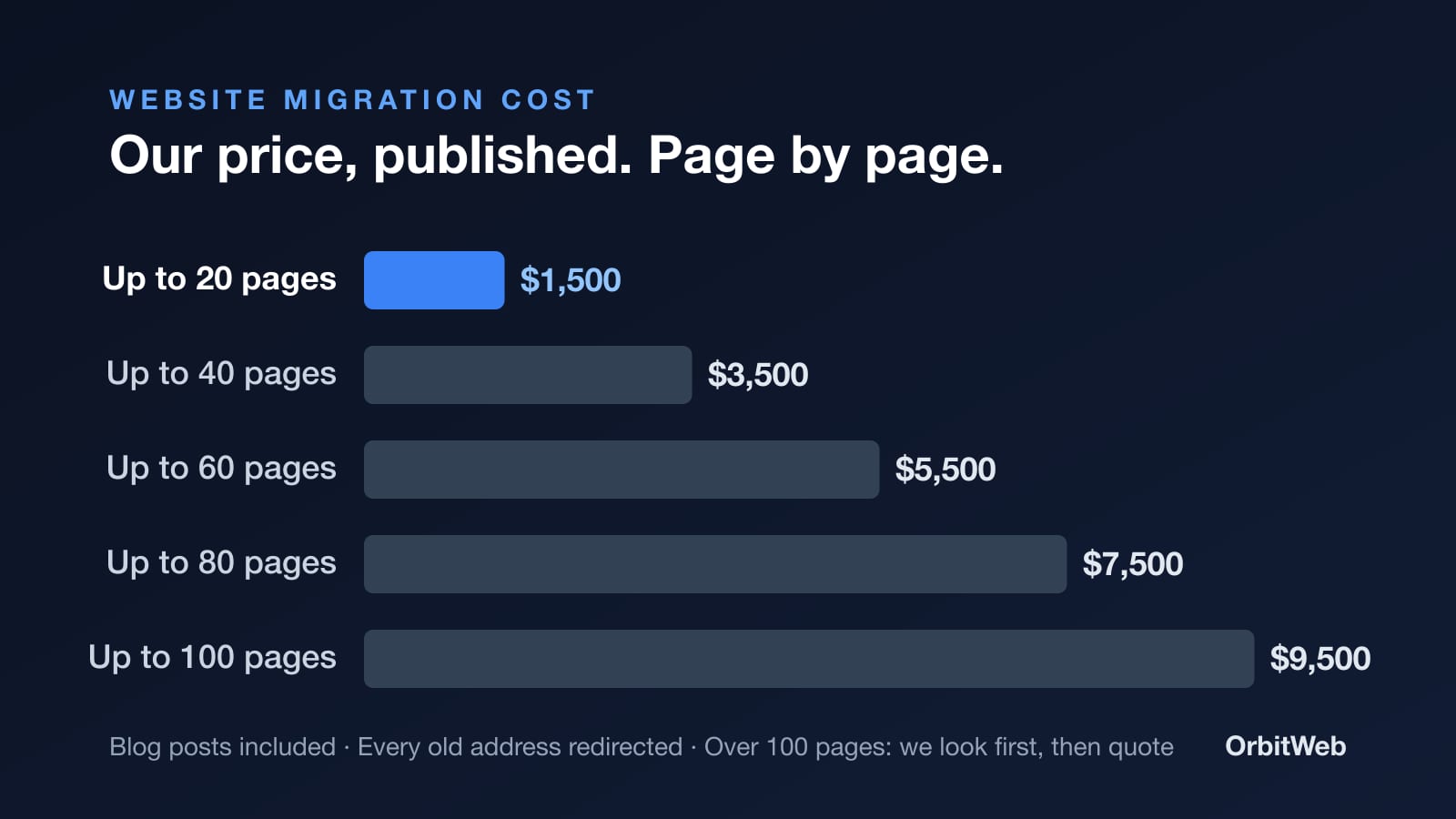
Search for website migration cost and you get ranges wide enough to drive a truck through. Here is our actual price, page by page, what it includes, what changes it, and the one part of a cheap move that ends up costing the most.
Quick Answer
A website migration with OrbitWeb costs $1,500 for a site of up to 20 pages, then $2,000 for every twenty pages after that: $3,500 for 40 pages, $5,500 for 60, $7,500 for 80 and $9,500 for 100, blog posts included. Keeping your current design costs nothing extra. Over 100 pages, we look at the site first and come back with a real number. Every move includes a permanent redirect from each old address to its new page, which is the part that protects your Google rankings.
Search for website migration cost and you'll find page after page of guides. Almost all of them give you a range instead of a price. One 2026 guide starts at $500 for a hosting move and puts most professionally managed small and mid-size business migrations between $3,000 and $20,000. Another puts a mid-size business at $6,000 to $20,000. Each comes with a list of things it "depends on".
It does depend. But it depends on things you can count.
Before OrbitWeb, I spent years on the other side of migrations: legacy systems at the Ontario Ministries, and data center moves for Toronto Hydro. That work teaches you one thing fast. A move is judged by what still works the morning after. Nobody remembers the plan. They remember what broke.
A small business website is smaller than a data center, but the rule is the same. So here is what we charge, what you get for it, and why the cheapest quote is often the most expensive one.
Website migration cost in 2026, by the size of your site
We price by page, because pages are the work. Each one gets rebuilt, checked on a phone and given a permanent redirect from its old address.
| Your site | What the move costs |
|---|---|
| Up to 20 pages | $1,500 |
| Up to 40 pages | $3,500 |
| Up to 60 pages | $5,500 |
| Up to 80 pages | $7,500 |
| Up to 100 pages, including blog posts | $9,500 |
| Over 100 pages | We look first, then quote a real number |
That's the whole ladder. No discovery fee, no "starting at" with a surprise on page three of the proposal. You can price your move in about a minute and see the total before you give anyone your email.
Not sure how many pages you have? Count the items in your menu, the pages under each one, and your blog posts.
How much does it cost to migrate a website? Four things decide it
1. How many pages you have
Pages are the biggest factor by far, which is why the price moves in steps of twenty. A 12-page plumbing site and a 19-page plumbing site cost the same. A 45-page site, blog posts included, lands in the 60-page step.
2. What happens to the design
You have three choices:
- Keep it exactly as it is. Same look, rebuilt properly underneath. No extra cost.
- You already have a new design in Figma, and we build it. Add $1,000.
- Start fresh. Our calculator calls this one "please put it out of its misery". We design it from scratch. Add $2,000.
3. What the site needs to do
Most sites only need pages and a contact form. If yours needs more, each extra has its own price:
- A pricing or quote calculator: $900
- Online booking: $750
- Payments or checkout: $1,200
- A second language: $950
- A CRM or email connection: $600
4. What doesn't change the price
Two things people expect to pay more for, and don't:
- Your platform. WordPress, Wix, Squarespace or custom code: the platform changes how we move it, not what you pay. Wix sites can't be exported, for example, so we rebuild every page and point each old address to its new home. Same price.
- Your blog. Existing blog posts come with the move at no extra cost, with their addresses and their search history. On a big blog, the last posts can arrive in the weeks after launch, because they move after the pages.
Why website migration cost ranges from $500 to $20,000
When one person quotes $500 and another quotes $20,000 for the "same" migration, they usually aren't selling the same thing.
A hosting move copies your site from one server to another, on the same platform. It's the cheap end of every range, and for a WordPress site moving hosts, it can be the right job.
A platform change is different. Moving from Wix to anything, or from an old WordPress theme to something faster, means every page gets rebuilt. That's real work, and it's what most of the "migration" quotes you get are actually for.
A redesign is a new website that happens to replace an old one. Some of the five-figure quotes are this, with the migration folded in.
The hidden difference sits underneath all three: whether anyone maps your old addresses before the new site goes live. That part never shows up in a screenshot of the new design. It shows up three weeks later, in your phone calls.
The expensive part of a cheap migration: lost rankings
Every page of your current site lives at an address, like yourbusiness.ca/emergency-plumbing. Over the years, Google has learned those addresses. Other websites link to them. Some of them bring you customers every week.
When a site moves and those addresses change without a plan, here's what happens:
- Before: someone searches "emergency plumber Cambridge", Google shows your old page, they tap it, and they call you.
- After a careless move: Google still shows the old address for a while. The customer taps it and lands on a "page not found" error. They hit back and call the next plumber on the list. Over the following weeks, Google drops the dead address, and the search history that page earned goes with it.
The fix is simple to describe and tedious to do. Before a single page is rebuilt, you list every address that Google knows and every one that brings visitors. Then each old address gets a permanent redirect (a 301) to its new page. Google's own guidance for moving a site says the same thing: use permanent, server-side redirects from old addresses to new ones. You can read it in Google's documentation on site moves with URL changes.
So ask whether a quote includes that list. If it doesn't, a $500 saving can turn into months of missed calls.
What every website migration should include
Whoever you hire, a complete move includes:
- Every page, photo and article moved
- Every old address redirected to its new page
- Titles, descriptions and structured business details on every page
- Forms reconnected, so every enquiry still reaches you
- Your Google Analytics and Tag Manager tracking carried over
- Every page checked on a phone before launch
Then ask three questions before you sign anything:
- "Will you map every old address to a new page with a permanent redirect?" If the answer is vague, keep looking.
- "Will my forms and tracking still work on day one?" A pretty site that drops enquiries is worse than an ugly one that doesn't.
- "Who owns the site, the domain and the accounts afterwards?" The answer should be you.
What the new site costs after the move
The move is a one-time price. Running the site afterwards is separate. Every site we move runs on WebCore, which starts at $99 a month and can be cancelled anytime. That's what runs the site, and it's why a moved site doesn't need someone babysitting plugin updates.
A move is also a good moment to fix speed. When we timed 1,277 Ontario business websites this fall with Google's own phone test, only 46 showed their main content within 2.5 seconds, Google's goal. A rebuild is a good moment to join those 46, because nobody has to untangle the old site first. You can see how Cambridge compares with the rest of Ontario.
Website migration cost: frequently asked questions
How much does a website migration cost?
At OrbitWeb, $1,500 for up to 20 pages, then $2,000 for every twenty pages after that, up to 100 pages ($9,500, blog posts included). Over 100 pages, we look at the site first and quote it properly.
Will a website migration hurt my Google rankings?
A migration done right keeps what you've earned. The addresses that already bring visitors get mapped before anything is rebuilt, and every old address points to its new page with a permanent redirect, so links and search history carry over. Rankings get hurt when a move skips that step.
Does it cost more to move from Wix than from WordPress?
No, the platform changes how we move a site, not the price. Wix sites can't be exported, so we rebuild the pages and redirect every old address. WordPress, Squarespace and custom-coded sites follow the same price ladder.
Are my blog posts included?
Yes, at no extra cost. Your posts keep their addresses and search history the same way your pages do. On a large blog, the last posts can arrive in the weeks after launch.
Can I keep my current design?
Yes, and keeping it costs nothing extra. Building a design you already have in Figma adds $1,000. A new design from scratch adds $2,000.
What isn't included in the price?
Your WebCore plan, which runs the site after the move. Plans start at $99 a month, and you can cancel anytime.
What if my site has more than 100 pages?
We look at the site first and come back with a real number. Scale is where the engineering shows: every page is still mapped, rebuilt and redirected, whether you have ten pages or several hundred.
Do I have to talk to a salesperson to get a price?
No, the quote calculator shows your total in about a minute, before you share your email. If you send it, a person looks at your site and replies, usually the same day.
Price your move
If your site is under 100 pages, you already know what moving it costs: find your step in the table above. To add design or features and see an exact total, use the calculator. To see how a move works from start to finish, read how we move a website without losing rankings. And if you'd rather ask a person, get in touch.
Rigo Guadron is the founder of OrbitWeb, an Ontario web design agency since 2017, and the builder of WebCore.