Research
Only 2 of 34 Cambridge Trade Websites Pass Google's Speed Test
By Rigo Guadron · · 10 min read
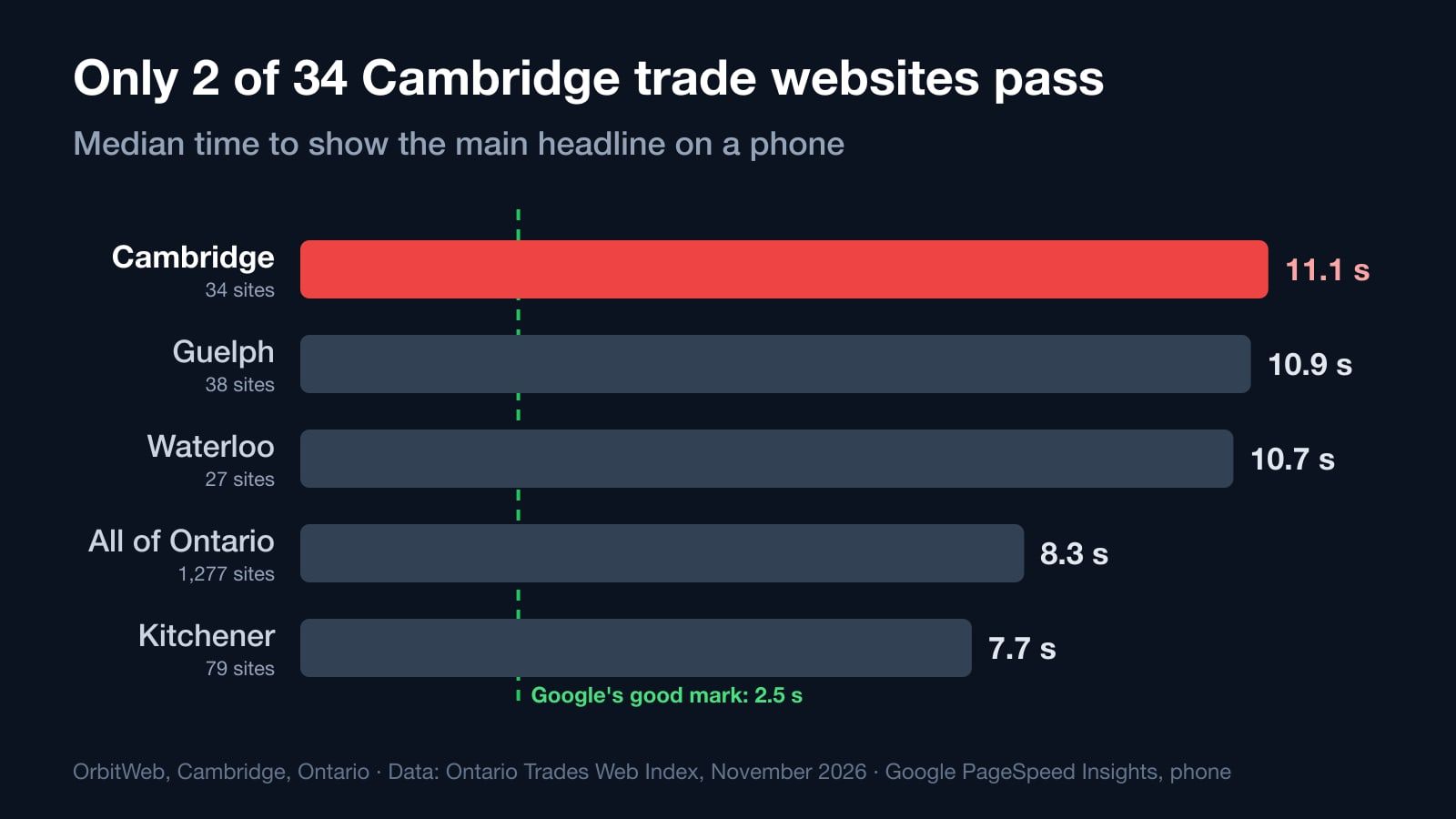
We ran Google's own speed test on 34 Cambridge trade and clinic websites. Only 2 put their main headline on a phone screen within 2.5 seconds, and the typical site took 11.1. Here's how Cambridge compares with Kitchener, Waterloo and Guelph, why the sites are slow, and what to fix first.
Quick Answer
We tested the websites of 34 Cambridge, Ontario trades and clinics with Google's PageSpeed Insights on a phone, between September 23 and October 10, 2026. Only 2 put their main headline on the screen within 2.5 seconds, the time Google asks for. The typical site took 11.1 seconds, and 21 of the 34 took longer than 10. That makes Cambridge the slowest city in our part of Ontario, and the fifth slowest of the 42 Ontario towns where we measured at least 10 sites.
OrbitWeb is based in Cambridge. When our Ontario Trades Web Index measured 1,277 local business websites this fall, the first thing I did was filter for my own city. I expected Cambridge to land somewhere in the middle.
It landed near the bottom.
These are our neighbours: movers, plumbers, electricians, landscapers, mechanics, vets and roofers. Most of them do good work. On the phone in your pocket, their websites mostly don't show it in time.
How we ran Google's speed test on 34 Cambridge websites
The numbers come from the November 2026 edition of the Ontario Trades Web Index, the research WebCore publishes every month. For Cambridge, that means:
- 34 websites of local trade and clinic businesses across 14 trades, each measured between September 23 and October 10, 2026.
- Google's own test. Every site went through Google PageSpeed Insights on a simulated mid-range Android phone over a slow 4G connection, the same way Google tests a page for its mobile score.
- One number that matters most. We count the moment the main content appears on screen, which Google calls Largest Contentful Paint. It's the moment a visitor stops looking at a blank or half-drawn page and sees what you do.
- No business is named. Not here, not in the Index. The point is the pattern, not a list of who got it wrong.
Google's guidance is simple: the main content should appear within the first 2.5 seconds. That's the line between good and needs work.
Cambridge next to its neighbours
Here is how Cambridge compares with the cities around it, measured the same way in the same edition.
| City | Websites measured | Headline within 2.5 s | Median time to headline |
|---|---|---|---|
| Cambridge | 34 | 2 | 11.1 s |
| Guelph | 38 | 1 | 10.9 s |
| Waterloo | 27 | 0 | 10.7 s |
| Kitchener | 79 | 7 | 7.7 s |
| All of Ontario (48 towns) | 1,277 | 46 | 8.3 s |
Guelph and Waterloo aren't far ahead. Kitchener does better than the rest of us, and even there only 7 of 79 sites make the mark. Across the whole province, 46 of 1,277 sites pass, which is 3.6%.
So Cambridge isn't alone. But the typical Cambridge trade website takes almost three seconds longer than the Ontario typical, and more than four times longer than Google asks.
A few more numbers from the same test:
- 31 of 34 Cambridge sites took longer than 3 seconds to show their headline.
- 21 of 34 took longer than 10 seconds.
- The median Google performance score was 56 out of 100, and 10 of the 34 scored under 50.
Why Cambridge websites are slow (it isn't the photos)
The usual suspect is heavy images. In Cambridge, that's not the main story.
Cambridge pages are lighter than average. The median Cambridge page weighed 2.0 MB, against 2.6 MB across Ontario. If weight were the problem, Cambridge would be faster than the province, not slower.
They keep the phone busy instead. Google's test measures how long a page ties up the phone's processor while it loads, a figure called Total Blocking Time. The median Cambridge site blocked the phone for 303 milliseconds, about twice the Ontario median of 155. That's code: page builders, sliders, plugins and widgets the phone has to run before it can show anything.
Google's report says the same thing in its own words. It flagged unused JavaScript on 30 of the 34 sites and unused CSS on 29. That's code each page downloads and works through without using it.
Half of them send visitors on a detour first. On 17 of the 34 sites, Google flagged multiple page redirects. Type the address, and the site bounces the phone from one version of the address to another before the real page even starts loading. Each hop is a round trip over a mobile connection.
WordPress is behind at least half of them. At least 17 of the 34 run on WordPress. WordPress itself can be fast. The slow ones usually carry a page builder and a stack of plugins, and every one of them adds code to every page.
What a slow first screen costs a Cambridge business
Picture someone in Hespeler with a burst pipe, standing in the kitchen with their phone. They search, tap the first plumber, and look at a white screen. At 11 seconds, a lot of them have already gone back and tapped the next one.
Speed also matters to Google itself. Google's own documentation says: "We highly recommend site owners achieve good Core Web Vitals for success with Search," and that this "aligns with what our core ranking systems seek to reward." The headline time we measured is one of those Core Web Vitals.
Relevance still comes first. A fast page about the wrong thing won't rank. But when two Cambridge businesses are equally relevant, the one that loads is the one people stay on.
There's one more gap worth knowing about. Of the 32 Cambridge sites where we could check, 16 had no LocalBusiness markup, the structured block of code that tells Google your business name, address, hours and service area in a form it reads directly. For a business that lives on local searches, that's a free signal left on the table.
Check your own website in one minute
You don't need us for this part.
- Go to Google PageSpeed Insights, paste your website address, and look at the Mobile results.
- Find Largest Contentful Paint. Under 2.5 seconds is good. Over 4 seconds is poor.
- Scroll down to Google's list of opportunities. If you see "Avoid multiple page redirects" or "Reduce unused JavaScript", you're in the same boat as most of Cambridge.
If you'd rather see it in plain language, our free website speed test runs the same Google test and explains each result without the jargon.
What to fix first
If your site is slow, this is the order I'd work in, from cheapest to biggest.
- Collapse the redirects. Your address should go to the final page in one step, straight to the https version you actually use. This is usually a settings change, not a project.
- Cut the code nobody uses. Remove plugins you don't need. Stop loading sliders, chat widgets and tracking scripts on every page before the visitor sees anything. Let them load after the page is up.
- Size the first photo for a phone. The main image should be a modern format like WebP, sized for the screen that shows it, and loaded first, not last.
- Don't hide your headline behind an animation. Many sites start the headline invisible and fade it in. It looks smooth on a fast laptop. On a phone, it means a blank screen, and Google's test can't even measure it. We caught this one on our own homepage while writing this report.
- Add LocalBusiness markup. Your name, address, phone, hours and service area, in the format Google documents for local businesses.
Google's guide to improving Largest Contentful Paint goes deeper on each of these.
We test our own site the same way
OrbitWeb is an SEO agency in Cambridge, and I don't think we get to publish this without holding our own site to it. So we run orbitweb.net through the same Google test. This week it caught something on us: our homepage headline faded in from invisible, so the test had nothing to measure. The fix goes live with this report.
That's the habit I'd want any Cambridge business owner to borrow. Check the number, fix the cheapest thing first, check again.
If you're in Cambridge, Kitchener, Waterloo or Guelph and you'd like a second pair of eyes, send us your address through our contact page and we'll show you what Google sees. If you want the weekly work done for you, that's what our local SEO services are for.
Frequently Asked Questions
What is Google's speed test?
It's Google PageSpeed Insights, a free tool at pagespeed.web.dev. It loads your page the way a mid-range phone on a mobile connection would, then reports how long it took to show the main content, how long the phone was blocked, and a performance score out of 100.
What is a good load time for a business website?
Google's mark for the main content is 2.5 seconds on a phone. Between 2.5 and 4 seconds needs improvement, and over 4 seconds is poor. Only 2 of the 34 Cambridge sites we tested made it under 2.5.
Does website speed affect Google rankings in Cambridge?
It's one factor, not the main one. Google says good Core Web Vitals help "for success with Search" and align with what its ranking systems reward. Relevance and your Google Business Profile matter more for local results, but speed decides whether the visitor stays once they click.
Why are so many Cambridge websites slow?
Mostly code and detours, not photos. Cambridge pages were lighter than the Ontario median but blocked the phone twice as long. Google flagged unused JavaScript on 30 of 34 sites and multiple redirects on 17.
How did you choose the 34 websites?
They're the Cambridge trade and clinic websites in the November 2026 Ontario Trades Web Index, across 14 trades, each measured once between September 23 and October 10, 2026 with Google PageSpeed Insights on a simulated phone.
Will you publish which businesses failed?
We don't, and we won't. The Index never names a business, and neither does this report. The goal is to show the pattern so every owner can check their own site.
How can I check my own website?
Run your address through Google PageSpeed Insights on mobile and look at Largest Contentful Paint, or use our free website speed test, which runs the same Google test and explains the results in plain language.
How long does it take to fix a slow website?
It depends on the cause. A redirect chain is often a settings change you can make in an afternoon. Unused code from plugins and page builders takes longer, and a site built on a very heavy page builder can be faster to rebuild than to repair. Start with the cheapest fix and test again.
Sources
- WebCore, Ontario Trades Web Index, November 2026 edition: 1,277 trade and clinic websites across 48 Ontario towns, measured with Google PageSpeed Insights on a simulated mid-range Android phone over slow 4G. The Cambridge, Kitchener, Waterloo and Guelph figures come from the same measurements.
- Google Search Central, Understanding Core Web Vitals and Google search results
- web.dev, Largest Contentful Paint (LCP) and Optimize Largest Contentful Paint
- Google Search Central, Local Business structured data
- Google, PageSpeed Insights